Gradle is an open source build tool which help us to accelerate developer productivity.
- Go to Gradle Services website(http://services.gradle.org/distributions/) and download the latest version
- Download the latest version gradle-4.7-rc-1-all.zip ( Latest version while writing this article) and you can download greater than 4.7 if available and make sure the zip file contains "all" keyword (gradle-*.*-rc-*-all.zip).
- Go to your download location and unzip the downloaded file
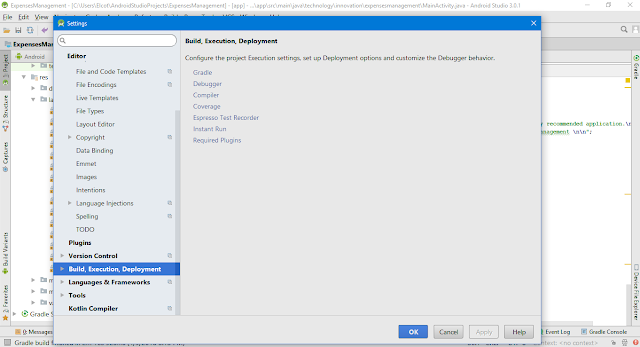
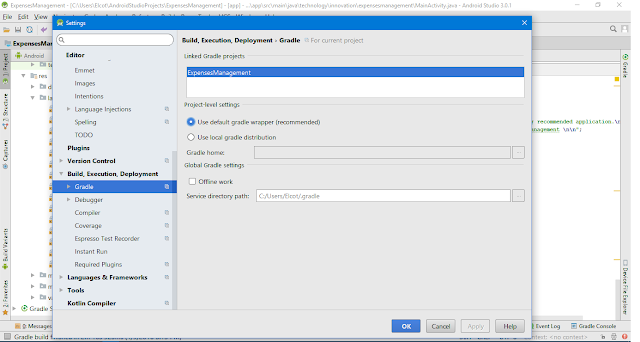
- Android Studio > File > Settings > Build, Execution, Deployment

- Gradle

- Project-level settings -> Select Use local gradle distribution -> Select the unzip folder of downloaded gradle version -> Click OK button to exit from the Settings window.
- Please Wait until Gradle build completes and your problem have been resolved.
- Final step to resolve this error
- Go to your project -> Gradle script -> build.gradle(Module.app)
- Change the targetsdkversion to be compilesdkversion (both should be equal)
- Click the Try again link in Gradle notification and your gradle will be finished without any problems.
not worked
ReplyDeletenot worked
ReplyDeletenot worked
ReplyDelete